What Is Duck Duck Clicker 3d?
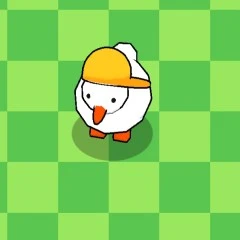
Dive into the fun world of a delightful 3D duck in this engaging clicker game! Developed by Hamdy Elzanqali and released recently, it offers a relaxing experience where players can interact with a charming duck through simple clicks. With vibrant 3D graphics and intuitive controls, you can earn points, unlock cool upgrades, and customize your duck’s look while enjoying light-hearted gameplay.
Duck Duck Clicker 3d Gameplay Mechanics
In Duck Duck Clicker 3d, players use their mouse or touchscreen to interact with a lively 3D duck. Each click on the duck earns points, which can be seen in the top left corner of the screen. As players accumulate points, they unlock various upgrades to enhance their earnings, including auto-clicking features that allow for effortless point accumulation even when not actively clicking.
The game features physics-based mechanics that make the duck react with fun animations to every click, providing an engaging experience for players of all ages. Players can customize their duck’s appearance by unlocking different outfits and accessories, adding a personal touch to their gameplay. The intuitive controls ensure that kids can easily navigate through the game, making it accessible and enjoyable.
As players progress through the game, they can focus on purchasing upgrades as soon as they become available. This strategy maximizes their earnings and enhances the overall gameplay experience. With no time limits or complicated objectives, Duck Duck Clicker 3d offers a relaxing environment where kids can enjoy light-hearted fun while interacting with their adorable digital companion.
Play Duck Duck Clicker 3d on Any Device
You can play this game directly in your web browser on desktop, laptop, tablet, or mobile.
How to Play Duck Duck Clicker 3d: A Beginner’s Guide
Welcome to the fun world of clicking! In this game, your main goal is to click on the adorable duck to earn points. Each time you click, you’ll see your points grow, which helps you unlock exciting upgrades and new outfits for your duck.
- Simply use your mouse or touchscreen to tap on the duck.
- Watch as your points increase with every click!
- As you collect points, you can purchase upgrades that make earning even easier.
- Enjoy watching your duck react with funny animations each time you interact with it.
- Take your time and have fun customizing your duck’s look with hats and glasses!
Mastering Duck Duck Clicker 3d Controls
To play, simply use your mouse or touchscreen to interact with the duck. Each click will earn you points, allowing you to unlock various upgrades and enhancements. The controls are designed to be intuitive and accessible for players of all ages.
- Mouse Controls: Click on the duck to earn points and watch it respond with fun animations.
- Touchscreen Controls: Tap the duck on your device to initiate clicks and gather points effortlessly.
- Auto-Clicking Feature: Unlock this upgrade to accumulate points even when you’re not actively clicking.
Pro Tips to Master Duck Duck Clicker 3d
Ready to become a Duck Duck Clicker 3D pro? Follow these tips to maximize your fun and earnings!
- Tap Often: Keep clicking on your duck to earn money quickly. The more you tap, the faster your earnings grow!
- Upgrade Early: Prioritize purchasing upgrades as soon as they become available. This will boost your earnings per click and per second.
- Auto-Clicking Advantage: Invest in auto-clicking features early on. This allows you to accumulate points even when you’re not actively playing.
- Watch for Bonuses: Keep an eye out for the yellow duck that floats across your screen; clicking it grants bonus earnings!
- Customize Your Duck: Have fun dressing up your duck! Unlock new clothes and accessories to make your experience more enjoyable.
- Relax and Enjoy: Remember, this game is all about having fun. Take breaks and enjoy the cute animations as you interact with your duck.
Key Features That Make Duck Duck Clicker 3d Special
Dive into a world of fun with this engaging game that offers unique features designed for enjoyment. Here’s what makes it stand out:
- Stunning 3D graphics that bring the duck to life, enhancing your gameplay experience.
- Relaxing gameplay with no time limits, allowing you to play at your own pace.
- Easy controls using your mouse or touchscreen for effortless interaction.
- Multiple upgrades available to boost your earnings and customize your duck’s appearance.
- Auto-clicking feature that helps you earn points even when you’re not actively playing.
- Fun animations that make every click enjoyable and engaging.
- Accessible on various platforms, including desktop and mobile devices.
- Achievements that unlock new outfits and accessories for your duck, adding a layer of excitement.
Play Duck Duck Clicker 3d Online for Free
Experience the fun of this browser-adapted version, allowing you to enjoy the charming antics of your favorite duck directly from your web browser. Compatible with Chrome, Firefox, Safari, and Edge, this online version retains all the engaging features of the original game while providing seamless access without any downloads. Dive into relaxing gameplay with intuitive controls, and interact with your duck as it responds to your clicks with delightful animations!
Is Duck Duck Clicker 3d Free to Play?
Yes, you can enjoy this delightful game completely free online! There are no fees or in-app purchases required, allowing you to immerse yourself in the fun without any financial commitment. All games on the site are free, enabling players to explore various titles and enjoy stress-free gameplay, including the relaxing experience of interacting with a charming duck.
Play Duck Duck Clicker 3d Unblocked
Yes, play Duck Duck Clicker 3d Unblocked on pizza-clicker.com. Whether you’re at school, at work, or on a break—you can play without any restrictions. Enjoy seamless gameplay with no annoying ads or downloads, making it perfect for quick sessions. Dive into the fun and experience the joy of clicking without limits!
Duck Duck Clicker 3d on GitHub
No need to search on GitHub, our version works on all devices at school or work. This game is developed using Blender and Godot, ensuring a high-quality experience with engaging 3D graphics. Enjoy endless clicking mechanics and unlock upgrades without any complicated objectives!
Download Duck Duck Clicker 3d (PC, iOS, Android)
Many fans enjoy downloading Duck Duck Clicker 3d for an even smoother experience. Here’s how:
- Android: Open the Google Play Store and tap Install.
- iOS: Open the App Store on your iPhone or iPad and tap Get.
- Duck Duck Clicker 3d APK: Android users who can’t use Google Play can find and download the APK from trusted sites to install offline.
- PC Steam: If you like playing on a computer, download the game for free via Steam and enjoy a bigger screen and controller support.
Duck Duck Clicker 3d Extension
Enhance your gaming experience with the Chrome extension for instant access to Duck Duck Clicker 3d. This extension offers seamless gameplay, allowing you to click and earn points without the need for a browser tab open, making it perfect for quick sessions. Additionally, enjoy possible offline modes that let you continue earning even when you’re not connected to the internet!
FAQs about Duck Duck Clicker 3d
Is Duck Duck Clicker 3d free to play?
Yes, Duck Duck Clicker 3d is 100% free to play. No download or registration is required, so you can jump right in!
Can I play Duck Duck Clicker 3d at school? (unblocked)
Yes, you can play it at school if it’s unblocked. Since it’s a browser-based game, it often works on school computers.
Does Duck Duck Clicker 3d work on mobile/phone?
Yes, it works on mobile devices. You can enjoy the game on your phone or tablet anytime!
Do I need to download Duck Duck Clicker 3d?
No, you do not need to download anything. The game runs directly in your web browser.
Can I play Duck Duck Clicker 3d on Chromebook?
Yes, you can play it on a Chromebook. It’s compatible with most browsers, making it easy to access.
What are the controls for Duck Duck Clicker 3d?
You use your mouse or touchscreen to click on the duck. Each click earns you points and unlocks fun upgrades!
What makes Duck Duck Clicker 3d fun?
The game features relaxing gameplay and cute animations. You can customize your duck and enjoy endless clicking fun!
How long can I play Duck Duck Clicker 3d?
You can play as long as you want! The game is designed for quick sessions or longer playtime without any pressure.
Conclusion
Duck Duck Clicker 3D is a delightful game that invites kids to tap, customize, and enjoy a playful 3D duck experience. With its engaging graphics and relaxing gameplay, it’s perfect for kids looking to unwind while having fun. The endless clicking mechanics and exciting upgrades keep the excitement alive!
We encourage you to dive into Duck Duck Clicker 3D online and explore all the charming features it has to offer. Don’t forget to share the fun with your friends and see who can unlock the coolest upgrades first! Happy tapping!